
[Important] All Montclair
Posted in: Phishing
How It Looks Legitimate
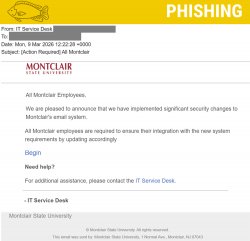
Attackers often copy familiar language and formatting to make their messages look official. In this case, the email:
-
Impersonates the IT department by using “IT Service Desk” as the sender name and in the signature.
-
References email security changes, which can sound like a normal IT update.
-
Targets all university employees, creating the impression of a campus-wide requirement.
-
Includes a call-to-action link labeled “Begin,” prompting users to take immediate action.
How We Know It’s a Phish
There are several red flags that reveal this message is not legitimate:
-
The email comes from an external address, not an official Montclair account.
-
The sender name was changed to appear as the IT department, even though the underlying email address is not from the university.
-
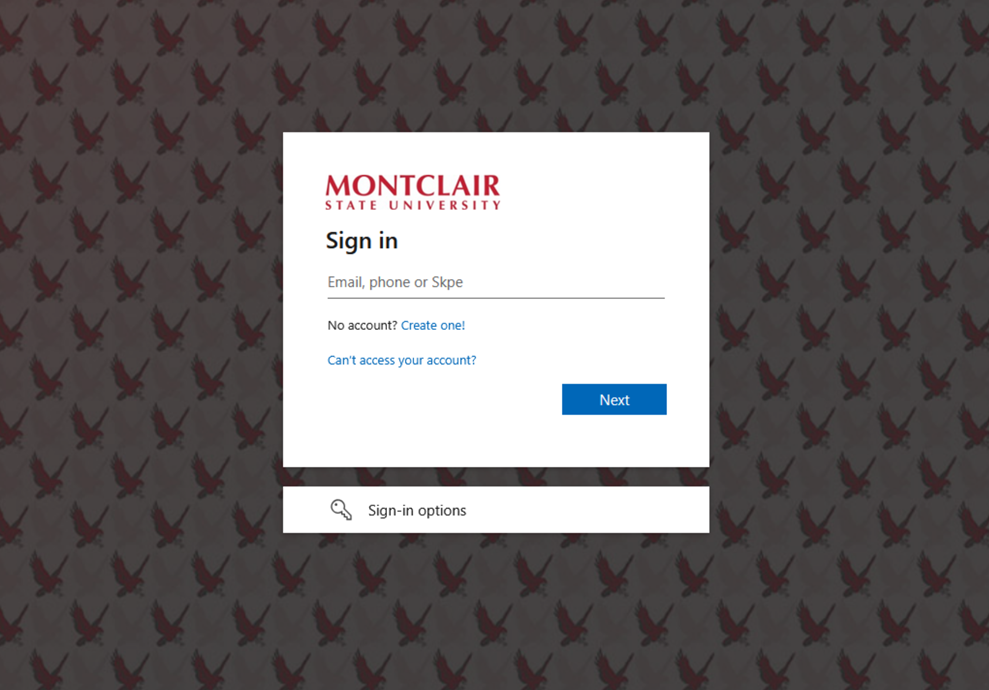
The message directs users to a login page through an embedded link, which is a common tactic used to capture credentials.
-
The wording is vague and urgent, lacking the details typically included in official IT communications.
Legitimate IT updates will never ask you to verify your password through an unexpected external link.
What Happens If You Click the Link
If users interact with the link in the email, they are taken to a fake login page designed to look like the university’s sign-in page.
If credentials are entered on this page, attackers can capture them and potentially:
-
Access the user’s Montclair email account
-
Send phishing messages from the compromised account
-
Access sensitive communications or files
-
Attempt to gain access to other university systems
Compromised accounts are often used to continue phishing others across campus.
What To Do
If you receive this email:
-
Do not click the link or reply to the message.
-
Report the email using the Phish Alert Button.
If you already clicked the link or entered your credentials:
-
Change your password immediately.
Additional Notes:
- Remember: Information Technology will never text you. We will also never request your password or Duo codes, ever.
- Information Technology will not ask you to verify accounts or submit passwords through unofficial forms or unexpected email links.
- Do you think you’ve fallen for a scam? Did you share personal information? Downloaded malicious content? Please contact the IT Service Desk at 973-655-7971 option 1 or email itservicedesk@montclair.edu.
- Use the Knowbe4 Phish Alert Button (PAB) to report malicious emails directly to the Information Security team for review. If you are not using the Gmail client please forward the email to phishfiles@montclair.edu.
- Always use the “hover over” technique to check web links before clicking! For more security tips please visit our Security Tips page.