
YOUR ACCOUNT MAY BE SUSPENDED
Posted in: Phishing
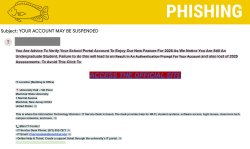

Cybercriminals are sending emails claiming students must verify their school portal accounts to access new features or avoid losing academic information. These messages are designed to steal login credentials and compromise accounts.
Why This Email May Look Legitimate
-
Mentions Montclair systems like student portals and assessments
-
Creates urgency by threatening account issues or loss of academic work
-
Includes real Montclair IT contact or location information
-
Appears to come from a real university email account (in this case, a compromised account)
Signs This Email Is Phishing
-
Contains poor grammar, awkward wording, and unusual capitalization
-
Requests account verification through an unexpected email link
-
Includes a link that leads to a fake login or credential harvesting form
-
Uses pressure tactics to make users act quickly without verifying legitimacy
Risks of Clicking the Link
Entering credentials into the malicious form may allow attackers to:
-
Access to Montclair email and systems
-
Send phishing emails from the compromised account
-
Steal academic, personal, or financial information
-
Spread malware or additional scams across campus
How To Protect Yourself
-
Do not click links in unexpected account verification emails
-
Access Montclair systems only through official websites or bookmarks
-
Carefully check sender email addresses
-
Report suspicious messages using the Knowbe4 Phish Alert Button (PAB)
Additional Notes:
- Remember: Information Technology will never text you. We will also never request your password or Duo codes, ever.
- Information Technology will not ask you to verify accounts or submit passwords through unofficial forms or unexpected email links.
- Do you think you’ve fallen for a scam? Did you share personal information? Downloaded malicious content? Please contact the IT Service Desk at 973-655-7971 option 1 or email itservicedesk@montclair.edu.
- Use the Knowbe4 Phish Alert Button (PAB) to report malicious emails directly to the Information Security team for review. If you are not using the Gmail client please forward the email to phishfiles@montclair.edu.
- Always use the “hover over” technique to check web links before clicking! For more security tips please visit our Security Tips page.