
Montclair State University Ongoing Student Report – Follow-Up
Posted in: Spear Phishing
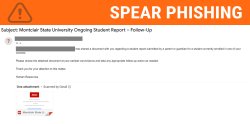
Why This Email Looks Legitimate
-
It references a real Montclair leader by name and title.
-
It mentions students and courses, making it seem relevant to faculty.
-
It appears to come from a Montclair email account, increasing trust.
-
The request to review a PDF document looks like a routine administrative task.
These elements are meant to make the email feel familiar so recipients are more likely to open the attachment.
What Happens If You Open the Attachment
The attached PDF does not contain a real report.
Instead, it displays a fake document viewer designed to look like an Adobe page. The page prompts the user to click a button or link to view the document.
If the button is clicked, the user is redirected to a malicious website designed to capture their university login credentials.
Signs It’s a Phishing Email
Although the email looks convincing, there are several warning signs:
-
Unexpected request – Faculty do not typically receive student reports directly from HR.
-
Vague information – No student name, course, case number, or department contact is provided.
-
Urgency to review a document without explanation.
-
Attachment as the main action, encouraging users to open the PDF immediately.
Risks of Interacting With the Email
Engaging with phishing attachments can lead to serious security risks, including:
-
Credential theft if your login information is entered on the fake site
-
Account compromise, allowing attackers to send phishing emails from your account
-
Further attacks against colleagues and students using your trusted identity
In this case, the attacker is already sending emails from a compromised university account, which increases the likelihood that recipients will trust the message.
What To Do
If you entered your login information, take action immediately:
-
Change your Montclair password right away.
- If you receive Duo alerts you did not request, mark them as fraud.
Always report the email using the Phish Alert Button whether you’ve fallen for it or not.
Additional Notes:
- Remember: Information Technology will never text you. We will also never request your password or Duo codes, ever.
- Information Technology will not ask you to verify accounts or submit passwords through unofficial forms or unexpected email links.
- Do you think you’ve fallen for a scam? Did you share personal information? Downloaded malicious content? Please contact the IT Service Desk at 973-655-7971 option 1 or email itservicedesk@montclair.edu.
- Use the Knowbe4 Phish Alert Button (PAB) to report malicious emails directly to the Information Security team for review. If you are not using the Gmail client please forward the email to phishfiles@montclair.edu.
- Always use the “hover over” technique to check web links before clicking! For more security tips please visit our Security Tips page.