
President Koppell Gift Card Smishing Scam
Posted in: Smishing
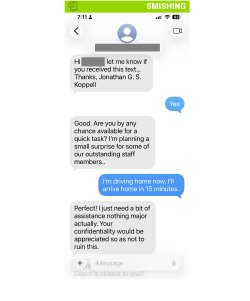
A recent smishing (SMS phishing) attempt targeted a member of our university community by impersonating President Koppell and requesting assistance with purchasing gift cards.
What Happened
The recipient—a faculty member—received a text message that read:
“Are you by any chance available for a quick task? I’m planning a small surprise for some of our outstanding staff members…”
While the message may seem harmless at first, it is the opening step in a common scam. In this case, the recipient quickly recognized something was off—specifically noting how unusual it would be for President Koppell to have their personal phone number—and did not engage.
How It Looks Legitimate
Attackers design these messages to feel natural and trustworthy:
- Friendly, low-pressure opener: The message starts casually, avoiding immediate suspicion.
- Positive context: Framing the request as a “surprise” for staff makes it feel thoughtful and legitimate.
- Authority impersonation: Claiming to be President Koppell adds credibility and discourages questioning.
- Gradual escalation: The initial message is vague on purpose—once the user responds, the attacker typically pivots to requesting gift cards.
How to Spot It’s a Phish
Despite its friendly tone, there are clear warning signs:
- Unexpected outreach: It is highly unlikely that university leadership would contact a faculty member directly via text for a task like this.
- Unrecognized phone number: Messages come from external or unknown numbers, not official Montclair channels.
- Vague request: The message avoids specifics upfront—a common tactic to draw the recipient into a conversation.
- Gift card angle (follow-up): These scams almost always lead to a request to purchase gift cards and share the codes.
- Bypassing normal processes: No official procurement, approvals, or communication channels are used.
What To Do If You Fall for It
If you have already engaged with this message:
- Stop communication immediately
- Do not purchase or share gift card codes: If you haven’t yet, stop. If you have, do not send the codes.
- Report it right away: You can forward smishing text message screenshots directly to phishfiles@montclair.edu.
- Contact the retailer if gift cards were purchased—quick action may help protect unused funds
- Block the sender
- Save screenshots and receipts for investigation
- If you have experienced financial loss or feel threatened, you may also contact University Police
Remember
Even when a message sounds friendly or well-intentioned, always pause and think:
- Would this person normally contact me this way?
- Does this request follow normal Montclair processes?
In this case, trusting that instinct—questioning why the President would have direct access to a personal phone number—helped prevent a potential scam.
Additional Notes:
- Information Technology will never text you. We will also never request your password or Duo codes, ever.
- Information Technology will not ask you to verify accounts or submit passwords through unofficial forms or unexpected email links.
- Do you think you’ve fallen for a scam? Did you share personal information? Downloaded malicious content? Please contact the IT Service Desk at 973-655-7971 option 1 or email itservicedesk@montclair.edu.
- Use the Knowbe4 Phish Alert Button (PAB) to report malicious emails directly to the Information Security team for review. If you are not using the Gmail client please forward the email to phishfiles@montclair.edu.
- Always use the “hover over” technique to check web links before clicking! For more security tips please visit our Security Tips page.