
🚨New Week Staff & Faculty School Notice !!!🚨
Posted in: Phishing
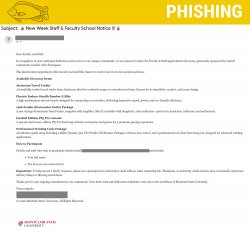
Why This Email May Look Legitimate
Cybercriminals design phishing emails to appear trustworthy. This message uses several tactics to lower suspicion:
-
Familiar Name in the Signature
The email includes the name and title of a real member of our campus community, making it appear officially endorsed. -
Professional Tone and Formatting
The message is written in formal language and references “faculty and staff appreciation,” which aligns with legitimate Montclair communications. -
High-Value, Recognizable Brands
The giveaway items reference well-known products, including:-
Airstream travel trailer
-
Stealth Bomber E-Bike
Referencing recognizable brands makes the offer feel more credible.
-
-
Old University Logo
The message uses an outdated Montclair logo to appear official.
Signs This Email Is Phishing
Despite its professional appearance, several red flags indicate this is not legitimate:
-
External Sender Address
The email originates from an external email address, not an official Montclair account. -
Mismatched Contact Information
Recipients are instructed to email a different external address that is not affiliated with the university. -
Request to Use a Personal Email Address
The message specifically asks you to use a personal (non-university) email account to respond.-
This is a major red flag. Scammers attempt to move conversations off official systems to avoid security monitoring.
-
-
Too Good to Be True Giveaway
Extremely high-value items are being offered with no official webpage, registration form, or verification process. -
Non-Existent Sponsor
The email references a “retired community member” who does not exist. -
Urgency & Limited-Time Framing
Phrases like “limited-time opportunity” are designed to pressure quick action. -
Unusual Subject Line & Excessive Punctuation
Multiple exclamation points and emoji-heavy formatting are common in phishing campaigns.
What Are the Risks?
If you respond to this email, you could:
-
Expose your full name and personal email address
-
Open the door to follow-up phishing attempts
-
Be targeted for financial scams
-
Become a victim of identity theft
-
Be added to scammer distribution lists for future attacks
Even a simple reply confirms your email is active, making you a higher-value target.
What Should You Do?
If you receive this message:
-
Do not reply.
-
Do not use your personal email address to respond.
-
Do not share any personal information.
-
Report the email using the Knowbe4 Phish Alert Button (PAB).
-
Delete the message after reporting it.
If you already responded, contact the IT Service Desk immediately.