
Watch Out: “University Act Now!!!” Email and Follow-Up Text Scam
Posted in: Smishing

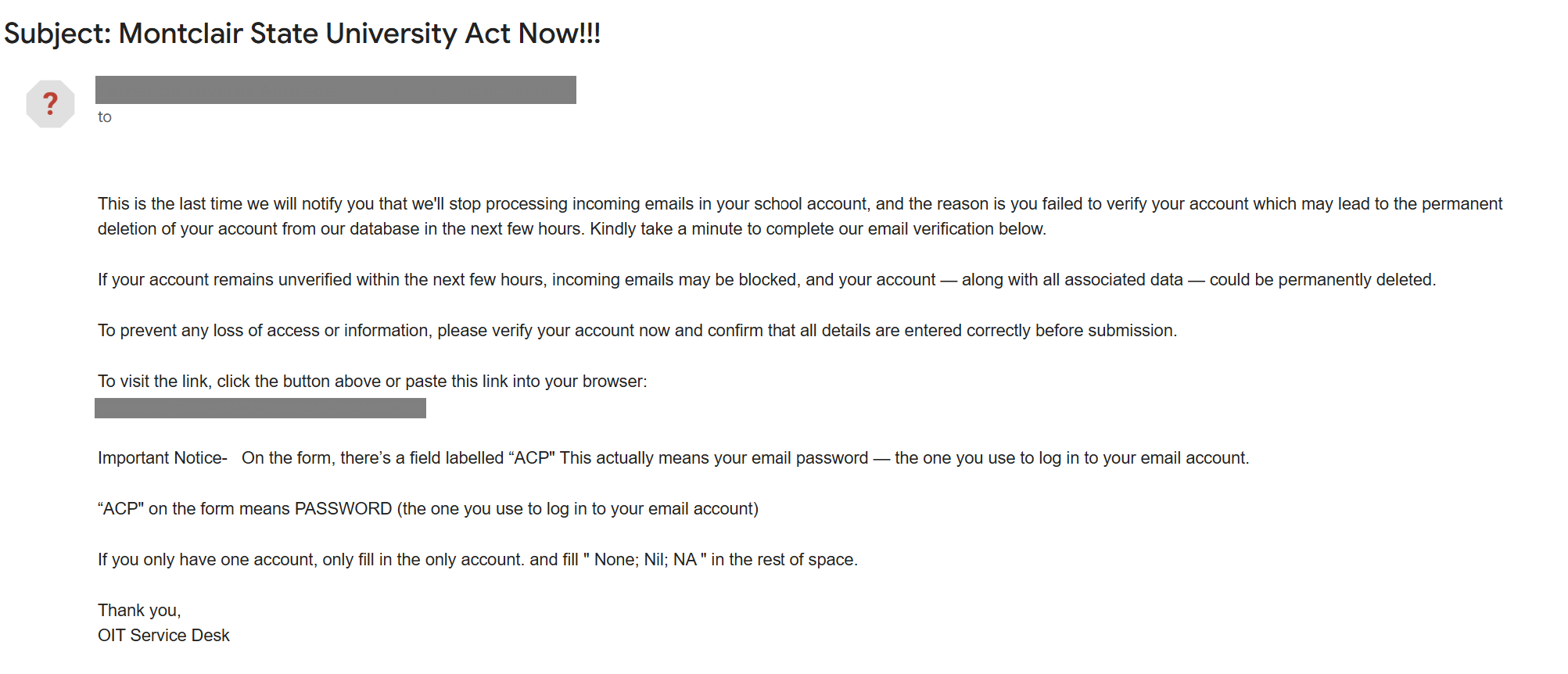
How It Looks Legit
-
Appears to come from the IT Service Desk: The email is sent from a compromised Montclair account, making it look like it’s coming from someone on campus.
-
Urgent account warning: It claims your email will stop receiving messages or be permanently deleted if you don’t verify your account within hours.
-
Simple “verification” form: The message links to a Google Form that looks like a quick step to fix the issue.
-
Follow-up help by text: In some cases, attackers will text the user pretending to be IT to help “resolve” the account problem.
How It’s a Phish
-
Urgency is used to pressure you: The message pushes you to act quickly before your account is supposedly deleted.
-
It asks for your password: The Google Form requests your email and password, sometimes labeling the password field as “ACP” to disguise it.
-
Text message impersonation: Attackers may text you claiming to be IT and ask for your password and Duo verification code.
-
IT does not operate this way: The IT Service Desk will never ask for your password or Duo code, and does not verify accounts through Google Forms or text messages.
What Happens If You Fall for It
-
Your credentials are stolen: Submitting the form gives attackers your email and password.
-
Duo can be bypassed: If you share your Duo code in the follow-up text, attackers can complete the login and access your account.
-
Your account may be used in more attacks: Compromised accounts are often used to send additional phishing emails to others on campus.
What To Do
-
Do not click the link or complete the form.
-
Do not respond to text messages claiming to be IT.
- Do not forward or respond to the email. Sharing is not caring.
- Block the phone number.
-
Report the email using the Phish Alert Button or sending screenshots to phishfiles@montclair.edu.
-
If you already entered your information, change your password immediately and contact the IT Service Desk.
Additional Notes:
- Remember: Information Technology will never text you. We will also never request your password or Duo codes, ever.
- Information Technology will not ask you to verify accounts or submit passwords through unofficial forms or unexpected email links.
- Do you think you’ve fallen for a scam? Did you share personal information? Downloaded malicious content? Please contact the IT Service Desk at 973-655-7971 option 1 or email itservicedesk@montclair.edu.
- Use the Knowbe4 Phish Alert Button (PAB) to report malicious emails directly to the Information Security team for review. If you are not using the Gmail client please forward the email to phishfiles@montclair.edu.
- Always use the “hover over” technique to check web links before clicking! For more security tips please visit our Security Tips page.