
Now Hiring: Remote Student Assistants
Posted in: Phishing
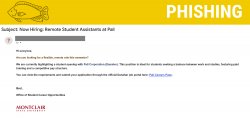
Why This Email Might Look Legitimate
Phishing emails are designed to look convincing. In this case, the attackers used several tactics to make the message appear trustworthy.
- A recognizable company name
The email references Pall Corporation (Danaher) to make the opportunity appear credible. Attackers often use well-known companies to make messages seem more authentic. - An appealing student job description
The promise of a flexible remote position with paid training targets students who may be looking for part-time work that fits around classes. - A university logo in the signature
The email includes the Montclair logo in the signature to make the message appear like it came from an official campus office. - Changing senders and subjects
Campaigns like this often rotate sender names and subject lines to avoid spam filters and reach more people.
How We Know It’s a Phish
Despite its professional appearance, there are several clear signs that the message is fraudulent.
- The sender is external
The email does not originate from a Montclair account. - The office does not exist
The message claims to come from the “Office of Student Career Opportunities,” which is not a department at our university. - It bypasses official job platforms
All legitimate student job opportunities are distributed through Handshake, the official platform used by Career Services. - The application link leads to a Google Form
Instead of directing users to a company hiring portal, the link sends applicants to a Google Form, which is not how legitimate employers typically collect job applications.
What Happens If You Click the Link
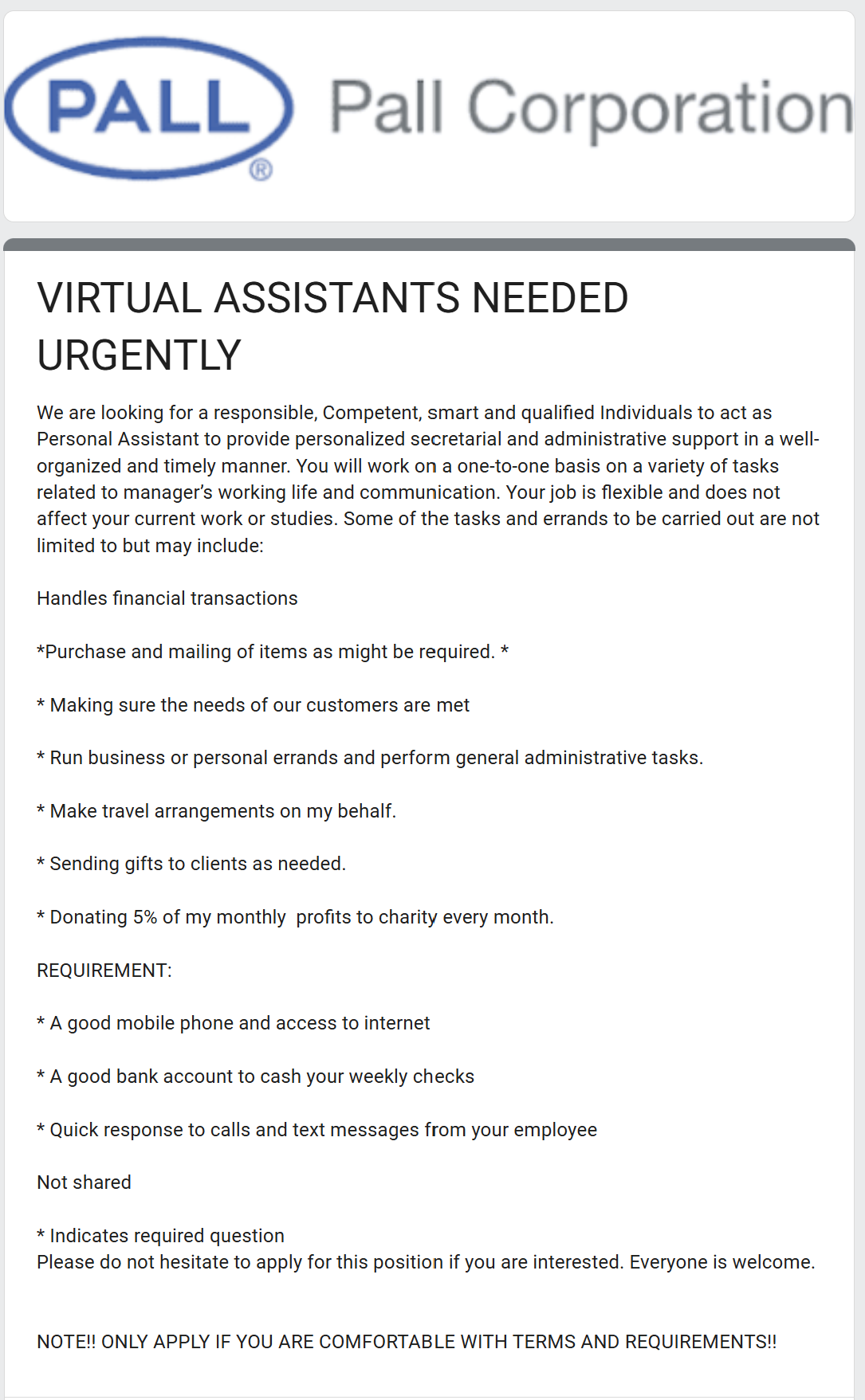
The link directs users to a Google Form posing as a job application. The form describes a “Personal Assistant” position that claims applicants will perform tasks such as running errands, handling administrative duties, making travel arrangements, sending gifts to clients, and even managing financial transactions.
The description promises flexible work that “does not affect your current work or studies” and states that applicants only need a mobile phone, internet access, and a bank account to cash weekly checks.
These details are common in job scam campaigns and raise several concerns.
Red Flags in the Job Description
- Handling financial transactions
The role claims applicants may be responsible for financial transactions or purchasing items. This is a common tactic used in scams where victims are later asked to deposit fraudulent checks or send money. - Emphasis on personal banking
The description specifically mentions needing a bank account to cash weekly checks, which is unusual for a legitimate job listing and can signal a potential fake check scam. - Vague job responsibilities
The tasks listed are broad and inconsistent, ranging from administrative work to errands and financial handling. Legitimate job postings typically provide clear, structured responsibilities and reporting lines. - Informal or unprofessional wording
The posting contains unusual phrasing and formatting, which is often a sign that it did not originate from a legitimate hiring process.
Information the Form Requests
The application form also asks for extensive personal information, including:
-
Home address
-
Phone number
-
Personal and school email addresses
-
Date of birth and age
-
Whether the applicant has a checking account and the name of their bank
Requesting this level of personal and financial information during an initial application through a basic online form is a major red flag.
If submitted, this information could be used for:
-
Identity theft
-
Future phishing attempts
-
Financial scams targeting the applicant
The form also contains spelling errors, such as “Immidiately,” which is another common indicator of phishing campaigns.
How to Stay Safe
When reviewing job opportunities sent through email, keep these tips in mind:
-
Verify the sender. Be cautious of job offers sent from external email accounts.
-
Check the department name. If you’ve never heard of the office, it may not exist.
-
Avoid forms asking for financial information. Legitimate employers do not request banking details during an initial application.
-
Use Handshake. All legitimate student job opportunities at our university are posted through Career Services on Handshake.
- Report it. If you are unsure of an emails legitimacy, use the PAB to report it.
If You Receive a Message Like This
If you receive a suspicious job offer:
-
Do not click the link
-
Do not submit personal information
-
Report the message using the Phish Alert Button (PAB)
Reporting phishing emails helps the Information Security team identify scams more quickly and protect the campus community.
Additional Notes:
- Remember: Information Technology will never text you. We will also never request your password or Duo codes, ever.
- Information Technology will not ask you to verify accounts or submit passwords through unofficial forms or unexpected email links.
- Do you think you’ve fallen for a scam? Did you share personal information? Downloaded malicious content? Please contact the IT Service Desk at 973-655-7971 option 1 or email itservicedesk@montclair.edu.
- Use the Knowbe4 Phish Alert Button (PAB) to report malicious emails directly to the Information Security team for review. If you are not using the Gmail client please forward the email to phishfiles@montclair.edu.
- Always use the “hover over” technique to check web links before clicking! For more security tips please visit our Security Tips page.