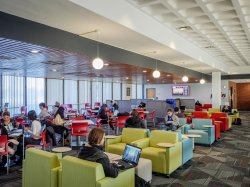
As a member of the University, you are able to schedule space in the Student Center on a first-come, first-served basis.
The Student Center reserves the right to deny, assign, reassign, or terminate space usage to a group or for a meeting or event when the event scope is beyond the physical or technical abilities of our staff or facility, or if security concerns cannot be addressed with reasonable staffing coverage. Reservation requests may also be denied if the organization or event is in conflict with university policies or regulations. In addition, Montclair State University Police may cancel or delay an event for safety (e.g. weather, loss of power or water) or security reasons, including while such event is in progress. Depending on the circumstances, reasonable attempts may be made to accommodate the sponsoring organization/department or client in an alternate space, date, and time.
Please Note: There is a different process for faculty/staff, students, and external guests.
The Student Center is a popular location to host events, and space is limited. In an effort to maximize space utilization and availability, the following policies will be effective July 1, 2025 for all events held on or after that date.
Late cancellation and no-show fees
Late cancellation: For event cancellation with less than 24 hours notice, event sponsors will be charged 10% of the sponsored guest room rate* for the space(s) reserved. This fee would not apply for University weather/emergency closures or delays.
No-show: Event sponsors who do not show up for a reserved event (no one present 15 minutes after scheduled event start time) will be charged 25% of the sponsored guest room rate* for the space(s) reserved. This fee would not apply for University weather/emergency closures or delays.
Update as of 7/24/25: Failure to arrive within one hour of the scheduled event start time will result in the forfeiture of the reservation and you will not be permitted to access the space.
Please be sure to notify Sidra Habal, Program Assistant for Student Center Scheduling, as soon as possible if you no longer need any spaces reserved.
Sponsored Guests
For departments and organizations that wish to bring external guests (i.e., conferences, events hosted on behalf of an external organization), a rental fee is required. The sponsored guest room rate* is discounted from the external client room rate. Fees must be processed and paid through WorkDay for this rental rate, otherwise external rental rates apply. Certificates of Insurance must be provided by the external organization. External clients wishing to rent space in the Student Center should complete this form.
*Four hour rental rate. Must be logged in to your Montclair State University Google account to view rates.
Extended Building Hour Fees
Please note the Student Center building hours. All events in the Student Center must end one hour prior to building close.
If you wish to extend the building hours, or host an event on a day the building is scheduled to be closed, the fees** are as follows for departments and University organizations:
Fees to extend building hours (event time + 1 hour): $50/hour
Fees to open building on days scheduled to be closed: $100 fee + $50/hour
**1 staff member, additional staff is $25/staff member/per hour, 1 hour minimum
Fees that are not paid within 30 days may result in the cancellation of future reservations. Contact studentcenter@montclair.edu to request extended hours.
Event request reminders
When submitting your request on 25Live, be sure to list the event start time and end time under ‘Event Date and Time’, and any set up and clean up time you may need as event organizers should be listed under ‘Additional Time’. Furniture will be set in the space prior to your requested set up time. Spaces will be unlocked approximately 10 minutes prior to scheduled setup time. (Use ‘Set-up time’ and ‘post-event time’ to indicate requested setup and clean up time)
As you are planning your events in the Student Center, be sure to provide your requested setup at least 1 week in advance. Requests provided after that time may not be accommodated. You do not need to submit work orders for space setups or IT services (i.e. microphones and projectors) in the Student Center or Student Center Quad. Setup requests can be included in the ‘Comments/Setup Requests’ box on the 25Live event request form. Student Center staff can advise you if additional information or processes are needed.
Requests for the Student Center should always be submitted at least two weeks in advance. We recommend putting a reminder on your calendar one week in advance of the reservation to confirm that you are still hosting the event and to verify your setup information, if needed.
Over the summer, the Student Center website will be updated to reflect these policies, and to include tips, tricks, and room specifications. The Student Center staff is here to help your event be a success. Please email studentcenter@montclair.edu with any questions.
Sign in to 25Live (upper right-hand area of the page) with your Montclair State NetID and password.
On the 25Live Home Tab click Event Creation Quick Start
Please Note: If you are not signed into 25Live, you will be prompted to do so.
Complete the fields that are relevant to your event.
- Event Name
- What’s in a name? More than most users may think! When naming events users should remember that 25Live is a web-based scheduling and calendar system and is viewable by anyone who may be visiting the Montclair State University Website. In addition, University Web Services is pulling event information from 25Live to populate other University calendars on the web.
- For this reason, we ask that users name events in a way that will be understandable to others and avoid acronyms when possible.
- Event Type
- Users should select the event type that best describes their event from their list of favorite event types or from the complete list of event types by clicking on the All Event Types link.
- Contact Roles
- The Requestor Contact Role is used to identify the organizer of the event or representative from the Organization responsible for the event.
- The Scheduler Contact Role is used to identify the person responsible for the space requested in 25Live.
- In some cases, users may be both the Requestor and Scheduler. In this case, only the Requestor Contact Role information need be entered.
- Primary Organization
- Users should select the organization or office responsible for the event from their list of favorite organizations, or search by organization name.
- Please Note: If the search does not return the expected result, try limiting the search to a key word in the organization name.
- Additional Organization(s)
- Users can also select any additional organizations involved with the event. Multiple organizations can be selected using this editor.
- Event Date/Time
- Users select the start and end dates and times for each event in this editor. Be sure to enter the EXACT start and end times for this date. Users should add pre- and post- event times for additional set up time, clean up time, etc. under the ‘Additional Time’ drop down.
- For one-day events with multiple occurrences (i.e. weekly meetings at the same time), users will enter the start date of the first occurrence then select Repeats Ad Hoc from the drop down box and add additional dates using the calendar tool.
- Head Count
- Users should enter the estimated number of attendees for their event in the Expected field.
- Locations
- Users should select the location(s) for each event from their list of favorite locations or search within the categories list in Public Searches.
- Please Note: If the search does not return the expected result, try limiting the search to a key word such as the building name. More than one location can be selected for an event. However, if users need locations in more than one category the requests should be submitted separately, by category. (For example, an event that needs the Student Center, University Hall and CELS rooms should be put into two separate requests. While an event in the Student Center Ballrooms and Rathskeller can be put in the same request.)
- Resources
- Resources are defined as equipment or services that are not associated with a specific location.
- Users should select the resource(s) for each event from their list of favorite resources or search by selecting the collection associated with the event location.
- Please Note: If the search does not return the expected result, try limiting the search to a key word in the resource name. More than one resource can be selected for an event.
- Event Description
- Information entered into this editor will appear in the 25Live Event Detail view. For example, if there is a website for the event, this would be an ideal location to display the URL.
- Categories
- Event Categories are just one of the many ways event data can be sorted in 25Live. Users should select all categories that apply to a specific event.
- Comments/Setup Requests
- This field is designed to give users an opportunity to send additional instructions or comments to schedulers about an event. This information is only viewable by the scheduler, requestor and any service providers or approvers of locations and/or resources assigned to this event.
- Users should add setup needs (i.e., tables, chairs, microphones, etc.) here whenever possible
The following message should be displayed at the top of the Event Reservation Wizard: Your event request has been submitted for approval.
Please Note: Requests for events in academic spaces will not be approved until after the add/drop period has concluded.
Event confirmation
- All requests will be entered with a TENTATIVE Event State. During the approval process, the Event State will be changed from Tentative to Confirmed.
- You will receive an email when the space is confirmed or denied.
Student organizations reserve space through Engage. Please email studentorgevents@montclair.edu with any questions.
Individual students needing space reserved for class projects (i.e. film shoots) must have their faculty member submit the space request through the process listed above.
External users and sponsored guests can request spaces in the Student Center for a fee. Certificates of insurance must be furnished.
External guests should complete the Student Center Rental Inquiry form. For sponsored guests (i.e. conferences), the sponsoring department should submit the request through 25Live and will be advised of rental rates as appropriate.
Note that financial services/institutions are not permitted to reserve space to sell products or services, and higher education institutions are not permitted to host recruitment events in the Student Center, unless hosted by Montclair State University Enrollment Management/Admissions.
External users and sponsored guests must furnish Certificates of Insurance (COI).
1 Normal Avenue
Montclair, NJ 07043
New Jersey Educational Facilities Authority
103 College Road East, 2nd Floor
Princeton, NJ 08540-6612
State of New Jersey
PO Box 001
Trenton, NJ 08625
Limits of Liability – $1,000,000.00 per occurrence $2,000,000.00 per aggregate. ENDORSEMENT MUST INCLUDE PARTICIPANTS.
What If I Have to Cancel My Event?
Faculty/Staff: The best way to cancel an event is to locate the original email confirmation from 25Live, and reply informing the scheduler that the event has been canceled.
Students: Email the Center for Student Involvement at studentorgevents@montclair.edu if you need to cancel your event.