
What IgniteAI features are available now in Canvas?
Starting Spring 2026, Canvas now includes a set of optional IgniteAI tools designed to support teaching and learning directly within the LMS. These features bring AI assistance into familiar Canvas workflows to help streamline common tasks, improve communication, and surface learning insights. Faculty have the option to enable or disable these features in their own courses via Settings > Feature Options.
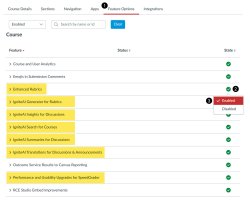
- Click on Settings in your course menu then click on the Feature Options tab.
- To enable the desired IgniteAI feature, click the feature’s State icon.
- Enable the the desired IgniteAI feature option.
IgniteAI features
- IgniteAI Search: An AI-enhanced course search in Canvas that lets students and instructors find content using natural, “meaning-based” queries, not just exact keywords.
(IgniteAI Search Guide | IgniteAI Search Nutrition Facts) - IgniteAI Translations (Discussions and Announcements): Allows faculty and students to translate Canvas text in place, supporting multilingual participation without leaving Canvas.
(IgniteAI Translations Guide | IgniteAI Translations Nutrition Facts) - IgniteAI Translations (Canvas Inbox): Translates private Canvas Inbox messages in place.
(IgniteAI Translations Guide | IgniteAI Translations Nutrition Facts) - IgniteAI Summaries for Discussions: Lets an instructor generate a quick AI-written recap of a discussion thread right inside Canvas.
(IgniteAI Summaries for Discussions Guide | IgniteAI Summaries for Discussions Nutrition Facts)
Feature Previews (Free through 6/30/2026)*
- IgniteAI Insights for Discussions: Uses AI to scan individual student replies and flag how relevant and substantive they are compared to the original prompt. Free through 6/30/2026 (Availability and functionality may change in the future).
(IgniteAI Insights for Discussions Guide | IgniteAI Insights for Discussions Nutrition Facts) - IgniteAI Generator for Rubrics: Within an Assignment, instructors can generate a draft rubric based on the assignment description, then edit and refine it before publishing. Free through to 6/30/26 (Availability and functionality may change in the future). Enhanced Rubrics must be enabled to use this feature.
(IgniteAI Generator for Rubrics Guide | IgniteAI Generator for Rubrics Nutrition Facts) - IgniteAI Grading Assistance for SpeedGrader: Allows instructors to use AI-assisted grading to generate suggested scores and feedback for written assignments based on the associated rubric. Enhanced Rubrics and Performance and Usability Upgrades for Speedgrader must be enabled to use this feature. Feature Preview (free through 6/30/2026 and may incur additional cost in the future)
(IgniteAI Grading Assistance for SpeedGrader Guide)
*Feature previews are free through 6/30/2026. Future availability and functionality may change based on institutional, budgetary, or administrative decisions.
Note: With the exception of Translations for Canvas Inbox, all tools must be enabled by faculty on the course level.