The Department of Teaching and Learning is committed to preparing educators to work toward equity and justice in a range of education settings, and against the exploitation, exclusion, and marginalization of humans. We aim to do so by combining well-informed educational approaches and teaching strategies with critical examination of relevant sociopolitical contexts. Thus, we are committed to helping current and future teachers as they engage in well-informed ways of thinking about their worlds. Our hope is that this will enable them to make sense of, and take action in, complex social moments and settings. This includes respecting the perspectives and experiences of students, teachers and community members who may identify themselves in any variety of ways. In addition, we recognize that thoughtful educational praxis requires thinking and action at multiple levels: individual, communal, and systemic. We are dedicated to helping teachers as they make meaningful connections between classroom practice, theories and research, educational policy, and the sociopolitical contexts within which individuals and groups exist.

Teaching and Learning

Dr. Elizabeth Erwin’s new book The Power of Presence was recently published by Gryphon House, Inc. “Young children live in the moment as they wonder, ponder, and notice ordinary treasures in everyday life that adults can so easily take for granted,” said Dr. Erwin. “When we take the time to pause, we realize children have much to teach us.”
Featuring diverse child and educator voices, The Power of Presence also provides research, knowledge, and tools to demonstrate how engaging in a deeper sense of awareness with young learners transforms classrooms, schools, and beyond. By engaging in reflective inquiry and mindfulness practices together, teachers and young children can co-create vibrant learning environments rooted in justice, joy, and humanity.
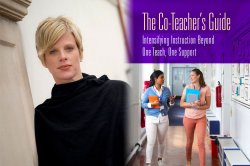
New book by Dr. Jennifer Goeke, The Co-Teacher’s Guide: Intensifying Instruction Beyond One Teach/One Support. This pragmatic guide provides concrete, detailed strategies for co-teachers looking to expand their instructional methods and involvement beyond the One Teach, One Support model. Including step-by-step examples, practical scenarios, and visuals of successful implementations to help you quickly and effectively put these tools into practice, each chapter also highlights specific tensions that can arise in your co-teaching partnership and frames effective solutions to move beyond them efficiently and effectively. While designed for both teachers in a co-teaching pair, the book’s tools can easily be applied on your own, making this an ideal resource for co-teachers with limited common planning time.

Dr. Tanya Maloney, Assistant Professor in Teaching and Learning; Dr. Bree Picower, Associate Professor in Teaching and Learning; and Dr. Jennifer Robinson, Professor and Executive Director of the Center of Pedagogy; recently received a $3,692,915 5-year grant for their project entitled “Teacher Quality Partnership grant for the Urban Teacher Residency at Montclair State University: UTR@MSU.” Dr. Maloney is the Principal Investigator and Drs. Picower and Robinson are co-Principal Investigators.

Dr. Mayida Zaal was awarded $500,000 from the Spencer Foundation’s Large Research Grant on Education for her study “Teacher Diversity, Retention, and Muslim-American Teachers”. The grant will support the first national-study of Muslim-American K-12 teachers and will be conducted by a seven-member participatory action research collective, Reclaiming: ME (Muslim Educator).
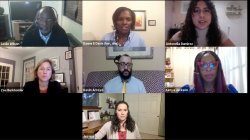
The debate over which history to teach in public school is ongoing. In September 2020 the Trump administration prohibited coverage of anti-racist and racial sensitivity training in federal agencies, criticized the 1619 Project, and proposed patriotic education. Then the Administration, through its Secretary of Education lauded the roll out of the 1776 Unites Curriculum. This panel will share where U.S. history lessons begin for them and recommend strategies for learning in home based and school classrooms.
Panelists: Dr. Leslie Wilson, Historian and Associate Dean, College of Humanities and Social Science, Montclair State University; Ms.
Kimya Jackson, Teacher and Assistant Principal, Redwood Elementary; Dr. Jessica Ferreras-Stone, Assistant Professor, Western Washington University; Dr. Zoe Burkholder, Historian, Montclair State University; Mr. Kevin Arroyo; and Moderator: Dr. Danné E. Davis, Associate Professor, Montclair State University.
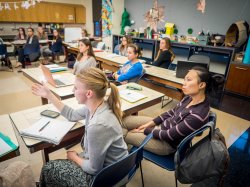
The Department of Teaching and Learning offers rigorous training, innovative research, and a network of partnerships to prepare teachers for the reality of schooling and to be equipped to recognize and disrupt systemic and social inequality.
Vision
Montclair State University is committed to the creation and development of teachers who strive to exemplify the knowledge, skills, and dispositions required for excellence in teaching.

The centerpiece of our work is a document called the Portrait of a Teacher, which, through a series of statements, embodies Montclair State University’s vision of an educator and informs the evaluation of candidates to the teacher education program, the assessment of student teaching, and the professional development of our community of teachers.
- Location:
- University Hall Room 3162
- Phone:
- 973-655-5407
- Fax:
- 973-655-7043
Hours of Operation
Between September and May, all academic departments in the College for Education and Engaged Learning will be open Monday through Friday from 8:30 a.m. – 4:30 p.m.
During the summer months, from June through August, the University is closed on Fridays. College departments and offices are open Monday through Thursday from 8:00 a.m. – 5:30 p.m.